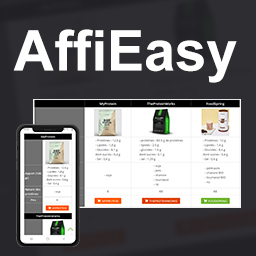
AffiEasy is a WordPress plugin for affiliate marketers and content publishers who want to manage links and tables without rebuilding tracking URLs by hand every time. The plugin is built around two main concepts: Webshops : each webshop stores your affiliate URL pattern and optional display preferen
PricingFree downloadThe WordPress.org download is free. Pro versions, add-ons or external services may cost extra.
CompatibilityRequires WordPress 5.1 and PHP 7.2.
SourceWordPress plugins · Nov 19, 2026
01 / Source details
Aboutthistool.
AffiEasy is a WordPress plugin for affiliate marketers and content publishers who want to manage links and tables without rebuilding tracking URLs by hand every time.
The plugin is built around two main concepts:
Webshops : each webshop stores your affiliate URL pattern and optional display preferences.
Reusable links and tables : create links once, reuse them anywhere with shortcodes, and insert them inside responsive comparison tables.
Typical workflow:
01Create a webshop with an affiliate URL template such as https://www.awin1.com/cread.php?p=[[product_url]]&clickref=[[click_ref]]
02Create affiliate links from that webshop by filling only the variable values like product_url and click_ref
03Insert links anywhere with the [affieasy_link id=123] shortcode
04Build tables with text, HTML, images, and affiliate buttons, then display them with [affieasy_table_content id=1]
AffiEasy also includes a quick-link metabox in the post and page editor. Paste a product URL, let the plugin detect the matching shop from its domain, and generate a short redirect URL in one click.
See the video below to discover the possibilities offered by this plugin.
Features
Create unlimited webshops with affiliate URL templates based on placeholders like [[product_url]] and [[click_ref]]
Save default affiliate button preferences per webshop: link text, background color, and text color
Optional product domain mapping per webshop for automatic shop detection from a product URL
Optional URL encoding for product URLs when a partner network requires it
Manage link label, category, nofollow, and open-in-new-tab options
Search and sort saved links by webshop, label, category, short URL, or final URL
Quick affiliate link creation from the post/page editor with automatic webshop detection
Automatic prefill of category and click_ref from the current post slug when creating links from a post context
Create unlimited tables and duplicate existing tables
Build table cells with text, custom HTML, images, or one or more affiliate buttons
Use column headers, row headers, both, or no headers
Customize header background color, text color, font size, and font weight
Control table max width, body background color, and responsive breakpoint
Display a dedicated responsive mobile layout below the chosen breakpoint
Use built-in icon placeholders in cells such as %TICK% , %CROSS% , %INFO% , %WARNING% , %HEART% , %LOCK% , %EMPTY-STAR% , and %FILLED-STAR%
Manage everything from a dedicated WordPress admin menu: Tables, Affiliate links, and Webshops
See it in action
Screenshots & previews.
Example of a comparison table on desktopResponsive mobile version of the same tableTable builder with text, image, and affiliate-link cellsWebshop setup with affiliate URL template and product domainsHeader style options and responsive settingsQuick affiliate link creation from the editor sidebar
02 / Source details
Gettingstarted.
01Install the plugin with the WordPress plugin installer or copy it into wp-content/plugins/ .
02Activate the plugin from the WordPress plugins screen.
03In the admin menu, open AffiEasy > Webshops and create your first webshop.
04Add your affiliate URL template and, if needed, product domains for auto-detection.
05Create affiliate links from AffiEasy > Affiliate links or from the quick-link metabox in the post/page editor.
06Create a table from AffiEasy > Tables .
07Insert a table with [affieasy_table_content id=1] and a saved link with [affieasy_link id=1] .
03 / Source details
Frequently asked questions.
Is AffiEasy responsive?
Yes. Each table can define its own responsive breakpoint, and AffiEasy switches to a mobile-friendly layout below that width.
How do webshops work?
A webshop stores the affiliate URL pattern for a merchant or network. You add placeholders such as [[product_url]] and [[click_ref]] , then AffiEasy asks only for those variable values when you create a link and builds the final tracked URL for you.
Which shortcodes are available?
Use [affieasy_table_content id=1] to display a table and [affieasy_link id=1] to display a saved affiliate link.
What is the difference with Table Maker?
Table Maker is no longer maintained. AffiEasy was rebuilt with a dedicated affiliate-link workflow: reusable webshops, reusable links, responsive tables, and faster link creation from one admin area.
FinderPress Media Auditor helps site administrators scan for broken images, missing Media Library files, unreachable media URLs, and other media issues across WordPress content. Use it to audit images, video, audio, PDFs, featured images, and attachment files without sending scan data to an external
The Accepted Payment Methods plugin is a straightforward, lightweight solution that enhances your website by displaying visually appealing icons of the payment methods you accept. This plugin is ideal for a variety of websites, including e-commerce platforms, service-oriented websites, and informati