The FinderPress tool directory
WordPress plugin
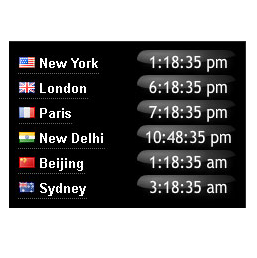
World Clock
World clock showing the local time at six major cities round the world. The plugin provides a choice of analog and digital clocks, colors and sizes. Analog or digital clocks Three different groups of world capitals Horizontal or vertical clock format Color selection for clock’s text, border and back
PricingFree downloadThe WordPress.org download is free. Pro versions, add-ons or external services may cost extra.
CompatibilityRequires WordPress 2.8.
SourceWordPress plugins · Oct 20, 2026
01 / Source details
About this tool.
World clock showing the local time at six major cities round the world. The plugin provides a choice of analog and digital clocks, colors and sizes.
- Analog or digital clocks
- Three different groups of world capitals
- Horizontal or vertical clock format
- Color selection for clock’s text, border and background
- Automatic adjustment of daylight saving time from the localtimes.info servers See example world clocks here localtimes.info/world-clock
See it in action
Screenshots & previews.
02 / Source details
Getting started.
- 01Download the zip file and extract the contents,
- 02Upload the folder world-clock to your WP plugin folder /wp-content/plugins/ directory,
- 03Go to Plugins > Plugins, and activate the plugin,
- 04Go to Appearance > Widgets, and drag the widget to a sidebar,
- 05On the widget selection panel, select clock type, clock orientation, world capital sets, clock colors and size
- 06Email problems to widgets at localtimes.info, we appreciate your input into improving the plugin
- 07If you find the widget useful, please take the time to rate our plugin. Thank you.
03 / Source details
Frequently asked questions.
How do I customize the colours?
Keep exploring




