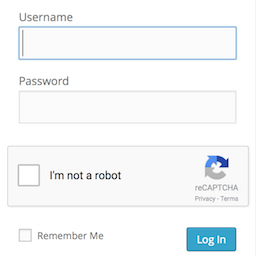
Login No Captcha reCAPTCHA
Adds a Google No Captcha ReCaptcha checkbox to your WordPress and Woocommerce login, forgot password, and user registration pages. Denies access to automated scripts while making it easy on humans to log in by checking a box. As Google says, it is “Tough on bots, easy on humans.”
Adds a Google No Captcha ReCaptcha checkbox to your WordPress and Woocommerce login, forgot password, and user registration pages. Denies access to automated scripts while making it easy on humans to log in by checking a box. As Google says, it is “Tough on bots, easy on humans.”
Screenshots & previews.
Install as normal for WordPress plugins.
Why should I install this plugin?
Many Worpdress sites are bombarded by automated scripts trying to log in to the admin over and over.
The No Captcha is a very simple, Google-supported test to quickly deny access to automated scripts. It is great by itself to instantly make your WordPress site more secure, or can be used with other plugins (like Google Authenticator, Limit Login Attempts, etc.) as part of a defense-in-depth strategy.
There are a lot of other plugins for this, why should I install this one?
I’ve gone to great lengths to try to make sure this plugin is easy to use and install, that it is compatible with different WordPress configurations, supports multiple languages, and that you won’t accidentally lock yourself out of the admin by using it. I use it myself on my own sites as well. So far, it just works.
Does this plugin support [insert name] custom login page plugin?
Probably not. Many custom login form plugins do not call the standard login_form action hook from their login forms, making it impossible to correctly render the captcha after the password prompt. For this reason, this plugin only supports the default wp-login.php and WooCommerce forms. Many such plugins do offer captcha fields (sometimes as a paid upgrade). This plugin tries to do just a few things well.




