One Click Close Comments
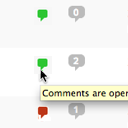
From the admin listing of posts (‘Edit Posts’) and pages (‘Edit Pages’), a user can close or open comments to any posts to which they have sufficient privileges to make such changes (essentially admins and post authors for their own posts). This is done via an AJAX-powered color-coded indicator. The
From the admin listing of posts (‘Edit Posts’) and pages (‘Edit Pages’), a user can close or open comments to any posts to which they have sufficient privileges to make such changes (essentially admins and post authors for their own posts). This is done via an AJAX-powered color-coded indicator. The color-coding gives instant feedback on the current status of the post for comments: green means the post/page is open to comments, red means the post/page is closed to comments. Being AJAX-powered means that the change is submitted in the background after being clicked without requiring a page reload.
This plugin will only function for administrative users in the admin who have JavaScript enabled.
Links: Plugin Homepage | Plugin Directory Page | GitHub | Author Homepage
Developer Documentation
Developer documentation can be found in DEVELOPER-DOCS.md . That documentation covers the hooks provided by the plugin.
As an overview, these are the hooks provided by the plugin:
- c2c_one_click_close_comments_click_char : Filter to customize the character, string, or markup used as the indicator used to toggle a post’s comment status.
A closer look.
- 01Install via the built-in WordPress plugin installer. Or install the plugin code inside the plugins directory for your site (typically /wp-content/plugins/ ).
- 02Activate the plugin through the ‘Plugins’ admin menu in WordPress
- 03When on the ‘Edit Posts’ or ‘Edit Pages’ admin pages, click the indicators to toggle the comment status for a post, as necessary.


