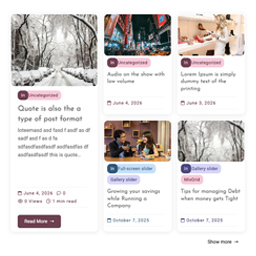
PMT Post Grid for block editor with elementor support adds a live, configurable blog post grid to your site — as a Gutenberg block, an Elementor widget addon, or both. Both Gutenberg and Elementor builders share the same underlying render function, so a grid built in one editor looks identical to a
PricingFree downloadThe WordPress.org download is free. Pro versions, add-ons or external services may cost extra.
CompatibilityRequires WordPress 5.8 and PHP 7.0.
SourceWordPress plugins · Nov 28, 2026
01 / Source details
Aboutthistool.
PMT Post Grid for block editor with elementor support adds a live, configurable blog post grid to your site — as a Gutenberg block, an Elementor widget addon, or both. Both Gutenberg and Elementor builders share the same underlying render function, so a grid built in one editor looks identical to a grid built in the other addon, and every setting behaves the same way regardless of which editor you use.
👉 Plugin Demo of post grid | Post grid Documentation | Plugin detail | Get Pro 👈
Three layouts
Post grid blog design 1 — a standard responsive grid (2-6 columns, any number of posts).
Post grid blog design 2 — a golden-ratio featured layout: one large featured post alongside a 2×2 grid of four smaller posts.
Post grid blog design 3 — a stacked list, each post split into an image and content column at the golden ratio, with an optional alternating image side.
Query controls
Filter by category, author, or hand-pick specific posts by title.
Exclude specific posts from the results.
Order by date or comment count.
Set columns and post count (Design 1).
A live, front-end category dropdown lets visitors instantly switch which category is shown, with no page reload.
Content controls
Toggle featured image, excerpt (with adjustable word length), tags, and category badge independently.
Auto-colored category badges — each category is assigned a distinct color automatically, no configuration required.
Optional “Read more” button and an optional main section title, both independently configurable.
Reorder each card’s elements (image, category, title, excerpt, meta, tags) via a simple drag-to-reorder list.
Style controls
Column and row spacing, image corner radius, card corner radius.
Full box-shadow control (offset, blur, spread, color, inset).
Optional card border (width, style, color).
Title font size, with an automatic scale for the smaller cards in Design 2.
Left/center/right text alignment.
“Show more” button
Automatically appears when there are more matching posts than the post grid currently displays, linking to the relevant category archive (or your site’s main blog page) in a new tab.
Built to stay in sync
Every setting is wired through shared PHP functions rather than duplicated per builder ( gutenberg editor and elementor addon ) or per layout, so a fix or feature added in one place applies everywhere — Design 1, Design 2, Gutenberg, and Elementor can’t drift out of sync with each other.
Developer hooks
This plugin fires several apply_filters() hooks, so themes and other plugins can extend or override its behavior without editing its files directly (changes to plugin files are lost on update; filters aren’t).
pmtpofob_post_grid_args
Filters the fully-merged settings array before anything is rendered — runs before the design is even dispatched, so it can change $args['design'] itself or override any individual setting. Fires once per grid instance, covering every design and both builders.
Filters a single rendered card’s HTML before it’s returned. Fires for every card, in every design.
apply_filters( 'pmtpofob_post_grid_card_html', string $html, int $post_id, string $variant, array $args ) $variant is `'full'` (Design 1 / Design 2's Column A), `'simple'` (Design 2's Column B), or `'row'` (Design 3).
pmtpofob_post_grid_category_color
Filters the color pair ( array( 'bg' => '#hex', 'fg' => '#hex' ) ) used for a category’s badge, meta text, tags, and Read more button. Override the auto-rotated palette with your own brand colors.
Filters the complete rendered output of a grid instance right before it’s returned — the entire thing: wrapper, header, dropdown, every card, Show more button.
Filters the schema.org ItemList array before it’s serialized to JSON-LD — add/remove fields, or return an empty array to suppress it entirely for a specific instance.
PMT PostGrid for block editor with elementor support is open source and developed on GitHub. Bug reports, feature ideas and pull requests are welcome:
GitHub repository
Report a bug or request a feature
See it in action
Screenshots & previews.
Design 1 -- standard responsive grid.Design 2 -- golden-ratio featured layout.Block editor settings panel (Gutenberg).
02 / Source details
Gettingstarted.
01Upload the plugin folder to /wp-content/plugins/ , or install directly through the Plugins screen in your WordPress admin.
02Activate the plugin.
03Gutenberg : in the block editor, add the “Post Grid” block and configure it in the sidebar.
04Elementor : with Elementor active, drag the “Post Grid” widget into your layout and configure it in the left panel. The widget only registers itself if Elementor is installed and active — no errors or dependency warnings if it isn’t.
03 / Source details
Frequently asked questions.
Does this post grid plugin work with both Gutenberg and Elementor?
Yes — as two separate integrations (a block and a widget) built on the same shared rendering code, so results are visually identical either way. You can use either one, or both on different pages of the same site.
Is the grid static or does it update automatically?
It’s fully dynamic. The grid queries your posts live on every page load — publish a new post, or edit an existing one, and the grid reflects that automatically. Nothing needs to be re-saved.
Does it work without Elementor installed?
Yes. The Gutenberg block works entirely independently. The Elementor widget only registers itself if Elementor is active; with Elementor inactive or not installed, that part of the plugin is simply inert.
How are category badge colors chosen?
Automatically. Each category is deterministically assigned one of several preset colors based on its ID, so the same category always gets the same color across your site with no setup required.
Can I show a specific set of posts instead of a category feed?
Yes — use the “Specific posts” picker to choose exact posts by title. When any are selected, they completely override the category/order settings and display in the order you picked them.
Can I customize this plugin’s behavior from my theme or another plugin, without editing its files?
Yes — see “Developer hooks” below.
What happens to my data if I delete this plugin?
Deleting the plugin (not just deactivating it) removes everything it stores: its own settings, its view-count tracking, and the short-lived cache used by the live front-end filter. It does not touch any block or widget you’ve placed in your pages/posts — that content is yours and stays exactly as it is, so if you reinstall the plugin later, your grids come back too.
FinderPress Media Auditor helps site administrators scan for broken images, missing Media Library files, unreachable media URLs, and other media issues across WordPress content. Use it to audit images, video, audio, PDFs, featured images, and attachment files without sending scan data to an external
The Accepted Payment Methods plugin is a straightforward, lightweight solution that enhances your website by displaying visually appealing icons of the payment methods you accept. This plugin is ideal for a variety of websites, including e-commerce platforms, service-oriented websites, and informati