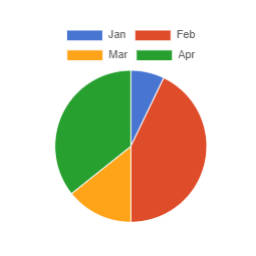
There are 6 predefined color palettes: choose the color palette from a drop down list.
Use the Background color overrides and border color overrides fields to set custom color values.
What options are there?
Options to control the chart display are:
Stacked – Toggle on to stack line or bar charts
Begin Y axis at 0 toggle
Fill toggle for line charts
Time line toggle for a date based axis, with selectable Time unit (stepSize)
Y-axes for multi axis charts
Color palette dropdown
Background color overrides. Enter comma separated hex codes.
Border color overrides. Enter comma separated hex codes.
Opacity – set the opacity of the background colours.
Height of the chart, in pixels
Bar thickness in pixels
Tension – for curved line charts
Legend font size
X-axis font size
What Chart script does it use?
v1.2.6 delivers chartjs v4.4.2 and chartjs-adapter-date-fns v3.0.0
What do I need to search for to find the block?
Chart or SB Chart
What if my first language is not English?
If your first language is not English then you could try:
French – graphique
German – Diagramm
Dutch – grafiek
Italian – grafico
Spanish – gráfico
Do I need to build this block?
No. The plugin is delivered with the production version of the block. If you do wish to modify the code then you can find instructions in the src folder.
Are there shortcodes available?
Charts can be embedded with the shortcode chartjs . The general syntax is as follows:
backgroundColors (string): list of custom background colors (separated by comma) to use for datasets. For example, if there are 3 datasets ( d1 , d2 and d3 ) and we want d1 to use the color #0000FF , d2 to use #FFFF00 and d3 to use #008000 , the value of the attribute must be #0000FF,#FFFF00,#008000 . If some colors are missing (ex.: #0000FF,,#008000 ), default colors from the theme (set with the attribute theme ) are used as fallback ( #0000FF,second theme color,#008000 ); default is no custom colors used
barThickness (int): thickness (in pixels) of a bar in bar charts; default is the default Chart.js thickness
beginYAxisAt0 (bool): make sure the Y axis begins at 0; default is false
borderColors (string): list of custom border colors (separated by comma) to use for datasets. See the description of the attribute backgroundColors for more details; default is the value of the attribute backgroundColors
class (string): class or classes to be added to the chart container; default is an empty string
fill (bool): fill the area under the line; default is false
height (int): chart height (in pixels); default is the default Chart.js height
indexAxis (string): axis to use as index; choices are x , y ; note that y is automatically used for horizontal bar charts; default is x
max (float): maximum value for Y axes; default is no maximum value
opacity (float): opacity to apply to the lines or bars; it must be between 0 and 1 ; default is 0.8
showLine (bool): show (draw) lines; default is true
stacked (bool): enable stacking for line/bar charts; default is false
tension (float): add Bezier curve tension to lines; when set to 0 , lines are straight; default is 0
theme (string): theme used for the chart colors; choices are Chart , Gutenberg , Rainbow , Tertiary , Visualizer , WordPress ; default is Chart
time (bool): add support for time line on the X axis; default is false
timeUnit (string): time unit to use if time line is enabled; choices are year , quarter , month , week , day , hour , minute , second , millisecond ; default is hour
type (string): type of chart; choices are bar , horizontalbar , line , pie ; default is line
yAxes (string): list of Y axes to which the datasets are bound. It allows to enable multi-axis charts. For example, if there are 3 datasets ( d1 , d2 and d3 ) and we want d1 to use the first Y axis, and d2 and d3 to use the second Y axis, the attribute value must be y,y1,y1 ; default is an empty string, so multi-axis feature is disabled and all datasets are automatically bound to the first (and only) Y axis y
function customize_legend($options, $atts, $series) { if (!isset($options->plugins)) $options->plugins = new stdClass(); if (!isset($options->plugins->legend)) $options->plugins->legend = new stdClass(); if (!isset($options->plugins->legend->labels)) $options->plugins->legend->labels = new stdClass(); if (!isset($options->plugins->legend->labels->font)) $options->plugins->legend->labels->font = new stdClass();
Website LLMs.txt and LLMs-Full.txt Generator is an LLMs.txt generator and llms-full.txt generator for WordPress. It helps site owners generate, manage, preview, validate, and serve AI discovery files from published public content. Use it to create structured /llms.txt and optional /llms-full.txt end
EngageDock AI is a customizable floating contact widget for WordPress websites that want more leads and faster visitor communication. It helps small businesses turn website traffic into calls, texts, emails, and callback requests from one clean contact panel. Key Features: Click-to-Call – One tap ca
Altify AI is an auto ALT text and AI ALT text plugin for WordPress images. It helps generate descriptive image ALT text for accessibility and image SEO. Use bulk image ALT text tools for your Media Library, generate featured image ALT text automatically, and scale WooCommerce image ALT updates with
The Accepted Payment Methods plugin is a straightforward, lightweight solution that enhances your website by displaying visually appealing icons of the payment methods you accept. This plugin is ideal for a variety of websites, including e-commerce platforms, service-oriented websites, and informati