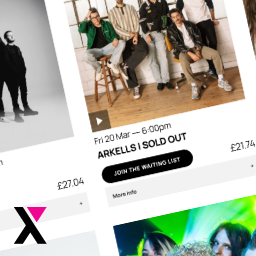
Xinc Events for Dice is the simplest way to embed your Dice.fm event listing on any WordPress site. If you’re a venue, promoter, or artist with a Dice.fm partner account, this plugin wraps Dice’s official JS widget in a proper WordPress block and shortcode so you never have to touch raw code again.
PricingFree downloadThe WordPress.org download is free. Pro versions, add-ons or external services may cost extra.
CompatibilityRequires WordPress 6.0 and PHP 7.4.
SourceWordPress plugins · Nov 29, 2026
01 / Source details
Aboutthistool.
Xinc Events for Dice is the simplest way to embed your Dice.fm event listing on any WordPress site.
If you’re a venue, promoter, or artist with a Dice.fm partner account, this plugin wraps Dice’s official JS widget in a proper WordPress block and shortcode so you never have to touch raw code again.
Note: This is an independent, community-developed plugin — it is not developed by, endorsed by, or affiliated with Dice FM or any of its parent companies. “Dice” and “Dice.fm” are trademarks of their respective owners.
Third-party service
This plugin relies on the Dice.fm event listing widget , a JavaScript-based service hosted by Dice FM. When the widget is displayed on your site, a script is loaded from Dice’s CDN ( widgets.dice.fm ) and event data is fetched from Dice’s API servers on behalf of your visitors.
All attributes are optional — omit any to inherit the global settings value.
The tags attribute accepts a comma-separated list: tags="The Underworld,Fabric London"
Performance
The Dice widget script ( dice-event-list-widget.js ) is loaded only on pages that contain the block or shortcode. It is never added to every page globally.
See it in action
Screenshots & previews.
Gutenberg block with placeholder and Display sidebar panel (layout, theme, font, button style, highlight colour)Settings page — Configuration and Formatting sections (Partner ID, API Key, display mode, event titles, toggles, number of events)Settings page — Styling and Filters sections (layout, button style, colour scheme, highlight colour, font family, venue/artist/city filters)Gallery layout on the frontend showing live event listings with images, prices, and buy buttonsLive Test Widget Preview on the settings page — see exactly how your events will look before embedding
02 / Source details
Gettingstarted.
01Upload the xinc-events-for-dice folder to /wp-content/plugins/
02Activate Xinc Events for Dice through the Plugins screen in WordPress
03Go to Settings → Dice Events and enter your Partner ID and API Key
04Add any filters (e.g. venue name) to narrow your event feed
05Use the Gutenberg block or [dice_events] shortcode to embed your listing
03 / Source details
Frequently asked questions.
Where do I find my Partner ID?
Log in to your Dice MIO dashboard, go to Partner Tools → Widget Creator . Your 8-character alphanumeric Partner ID is shown there. You can also generate it at dice.fm/partners/widget .
Does this work with the Classic Editor?
Yes — use the [dice_events] shortcode in any post, page, or text widget.
Where do I find my API Key?
Log in to your Dice MIO dashboard, go to Partner Tools → Widget Creator . Your API Key is shown there. Both the Partner ID and API Key are required for the widget to work.
Can I show events from a specific venue only?
Yes. Go to Settings → Dice Events → Filters and enter the venue name (e.g. “The Underworld”). You can also filter by artist, promoter, city, tags, price range, or Dice internal IDs. Multiple values can be comma-separated. The tags shortcode attribute also accepts comma-separated values for per-instance filtering.
Can I have multiple widgets on the same page?
Yes. Each block or shortcode instance gets a unique container, so you can embed multiple listings (e.g. different filtered views) on a single page.
Why does the block show a placeholder in the editor?
Dice’s widget script does not run inside WordPress’s editor iframe. You’ll see a styled placeholder instead. Use the Test Widget Preview on the Settings page to see how your events look.
Is this an official Dice.fm plugin?
No — this is an independently developed plugin that wraps Dice’s official public widget. All event data is served from Dice’s own infrastructure. Dice FM is a trademark of its respective owner.
I see “Please set your Partner ID” in the editor — why?
Go to Settings → Dice Events and enter your Dice Partner ID. The block requires a valid Partner ID to render on the frontend.
FinderPress Media Auditor helps site administrators scan for broken images, missing Media Library files, unreachable media URLs, and other media issues across WordPress content. Use it to audit images, video, audio, PDFs, featured images, and attachment files without sending scan data to an external
The Accepted Payment Methods plugin is a straightforward, lightweight solution that enhances your website by displaying visually appealing icons of the payment methods you accept. This plugin is ideal for a variety of websites, including e-commerce platforms, service-oriented websites, and informati