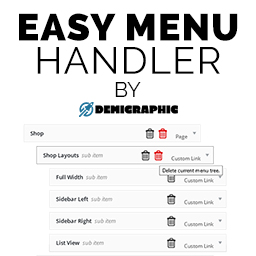
Easy Menu Handler (EMH)
Time is money and being able to complete your tasks faster is what matters. With Easy Menu Handler (EMH) two new buttons will be added to your WordPress Menu items which will provide you with the functionality to delete a specific menu item or menu branch directly, without the need to first open the
Time is money and being able to complete your tasks faster is what matters.
With Easy Menu Handler (EMH) two new buttons will be added to your WordPress Menu items which will provide you with the functionality to delete a specific menu item or menu branch directly, without the need to first open the menu tab.
This is extremely helpful especially to developers/users who have just installed a brand new theme and imported the demo content which will populate their menu’s with very long menu structures.
- 01Upload EasyMenuHandler to the /wp-content/plugins/ directory
Alternative,
- 02Navigate to Plugins > Add New
- 03Select ‘Upload Plugin’
- 04Click on ‘Browse…’ and select the EasyMenuHandler zip file and click ‘Install Now’
After that two new buttons should appear on your menu items toolbar’s under Appearance > Menus.
Frequently asked questions.
Bug Report/Suggestion
If you have any difficulties using this plugin or having a suggestion, please feel free to email us at wordpress@demigraphic.co.uk


