Modern Footnotes
Footnotes optimized for desktop and mobile, inspired by the styles of Grantland and FiveThirtyEight. Use a footnote in your post by using the footnote icon in the WordPress editor or by using the shortcode: [mfn]this will be a footnote[/mfn] The plugin will automatically associate sequential numbers
Footnotes optimized for desktop and mobile, inspired by the styles of Grantland and FiveThirtyEight.
Use a footnote in your post by using the footnote icon in the WordPress editor or by using the shortcode: [mfn]this will be a footnote[/mfn] The plugin will automatically associate sequential numbers with each plugin.
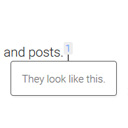
On desktop, footnotes will appear as a tooltip when the user clicks on the number. On mobile, footnotes will expand as a section below the current text.
You can also use the [mfn_list] shortcode to display a list of footnotes used in the article.
The official GitHub repository is at https://github.com/seankwilliams/modern-footnotes
Shortcode options
You can modify some behaviours or styles of your footnotes by using the following options within our shortcode. [mfn referencenumber=3]This footnote will have the number 3[/mfn] [mfn class=’my-pretty-class’]This footnote will have ‘my-pretty-class’ as additional class, allowing for custom styling of individual footnotes.[/mfn] [mfn referencereset=’true’]This footnote will reset the footnote counter and therfore receive 1 as its number. Following footnotes will also receive their number according to this new start.[/mfn]
Screenshots & previews.
- 01Upload the modern-footnotes folder to your wp-content/plugins directory.
- 02Activate the plugin in the WordPress Plugins section.
- 03Use a footnote in your post by using the footnote icon in the WordPress editor or by using the shortcode: [mfn]this will be a footnote[/mfn]
- 04




