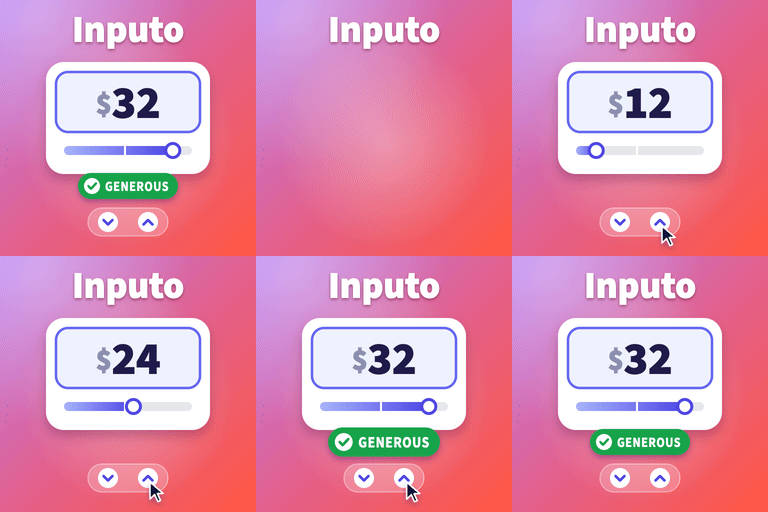
Inputo turns any WooCommerce product into a pay what you want product. You decide the lowest amount you accept and the amount you suggest, and your customers choose what they pay. It works for digital downloads, donations, courses, artwork, tickets, tips and anything else where a flexible price make
PricingFree downloadThe WordPress.org download is free. Pro versions, add-ons or external services may cost extra.
CompatibilityRequires WordPress 6.4 and PHP 7.4.
SourceWordPress plugins · Oct 20, 2026
01 / Source details
About this tool.
Inputo turns any WooCommerce product into a pay what you want product. You decide the lowest amount you accept and the amount you suggest, and your customers choose what they pay. It works for digital downloads, donations, courses, artwork, tickets, tips and anything else where a flexible price makes sense.
Live demo: Free version | Pro version
Documentation: Free version | Pro version
Support: propluginslab.io/support
What makes it different
A price guide, not just a box. Every product has a minimum, a suggested, a generous and an optional maximum amount. Type them per product, or let them be worked out from the regular price with shop wide percentages.
A price meter that encourages. As the customer types, a bar fills and a short message thanks them, with three levels you name yourself: low, fair and generous.
Works with variable products. Switch a named price on for some variations and keep fixed prices on others.
Reads any number format. Customers can type 12.50, 12,50 or 1.250,00 and it is understood.
Correct with tax. The amount a customer types is read the way your shop shows prices, so the cart always matches what they typed.
Checked on the server, every time. Amounts are validated in the browser for a friendly form, and again on the server when the product is added, whenever the cart is checked, and before checkout. A named price product can never reach an order without a valid amount.
Live preview. Every setting that changes the price box updates a preview on the settings screen as you type.
Documentation built in. A Documentation screen inside the plugin explains every option with examples.
Features
Named prices for simple products and for individual variations
Minimum, suggested, generous and maximum amounts per product or per variation
Shop wide default percentages of the regular price
Optional free orders, only when you set a minimum of exactly zero
Plus and minus buttons with a step you choose, and arrow key support
Starting value: empty, the suggested price, or the minimum
Price meter with your own level names and messages
Card or minimal style, and your own accent colour
Choice of price wording on product pages and in shop lists
Shop list buttons that lead to the product page with your own wording
Your own Add to cart button text on named price product pages
Filter the admin product list to named price or fixed price products
A Named price column in the admin product list with each product’s minimum, suggested and maximum amounts
The chosen price shown under the item in the cart, optional
Named and suggested price recorded on every order line, and shown on the order screen
Order again brings back the same amount
Block themes: works in the Add to Cart with Options block, variable products included
Block cart and checkout, classic cart and checkout, and High Performance Order Storage
Store API support with a clear error when an amount is missing
Theme template override and CSS custom properties
Accessible: labelled field, screen reader announcements, reduced motion support
Translation ready
Privacy
Inputo makes no requests to external services, loads nothing from third party servers, and collects no data about you or your customers. The only data it stores is its settings, the amounts you set on products, and the amount a customer chose on each order line.
Pro version
Inputo Pro is a separate plugin from ProPluginsLab that includes everything in this free plugin and adds:
Quick amount buttons, as shares of the suggested price or fixed amounts, and a price slider
Rules that switch named price on for whole categories or tags, each with its own percentages
Access by login or customer role, with a message for everyone else
Wording per product, for the field label, suggested line and meter messages
A celebration with confetti and a thank you badge, drawn locally
The average real customers paid, shown once a product has enough orders
Reports with a chart, top products and CSV export, net of refunds and per currency, plus settings import and export and bulk actions
WooCommerce Subscriptions support, currency switcher support, and rules and products with start and end dates
A shortcode and a block that place the price box on any page, and a price box per item in grouped products
This free plugin is complete on its own and nothing in it is locked or limited.
External services
This plugin does not connect to any external service. It makes no remote requests, loads no scripts, styles, fonts or images from other servers, and sends no data anywhere. The links to propluginslab.io in this readme and on the plugin’s own screens are ordinary links that are only followed when you click them.
More plugins from ProPluginsLab
Free on WordPress.org:
Back In Stock Notifier for WooCommerce – Waitlist and restock email alerts for out of stock products.
Recovero – Cart Recovery for WooCommerce – Recover abandoned carts with automated emails.
Anticipo – Pre-Orders for WooCommerce – Take pre-orders before a product launches.
Affireo – Affiliates for WooCommerce – Run an affiliate and referral program.
Storefold – Multivendor Marketplace for WooCommerce – Turn your store into a multivendor marketplace.
Dispatchio – Shipment Tracking for WooCommerce – Add tracking numbers and shipment updates to orders.
Presentero – Gift Cards for WooCommerce – Sell and redeem digital gift cards.
Kitero – Product Configurator for WooCommerce – Build composite products and kits.
Plusero – Extra Fees for WooCommerce – Add conditional checkout fees and surcharges.
Mercenza – B2B for WooCommerce – Sell wholesale with customer groups, wholesale prices and trade accounts.
Visuaro – Product Designer for WooCommerce – Let customers design custom products in the browser.
Christmas Snow – Festive Snowfall Effect – Add a lightweight snowfall effect to any site.
Pro plugins at propluginslab.io :
Recovero Pro
Anticipo Pro
Affireo Pro
Storefold Pro
Dispatchio Pro
Presentero Pro
Kitero Pro
Plusero Pro
Inputo Pro
Mercenza Pro
Visuaro Pro
Back In Stock Notifier Add-ons – 26 add-ons incl. Mailchimp, Klaviyo, Twilio SMS, WPML, or all of them in the Bundle .
See it in action
Screenshots & previews.
The percentages in Price guide are used for every product that has no amounts of its own. The preview on the right updates as you type.Turn on Name your price, then type amounts or leave them empty to use your default percentages.Each order line keeps the named price and the suggestion at the time of purchase.The meter shows the fair level and its message while the amount sits between the suggested and generous price.The style, accent colour and show options change the preview at once.Use {price} in labels, {min} in the below the minimum message and {max} in the above the maximum message.Amounts you leave empty are worked out from the Regular price.
02 / Source details
Getting started.
01Install and activate WooCommerce.
02In your WordPress admin, go to Plugins, Add New, search for Inputo, then install and activate it. Or upload the plugin folder to /wp-content/plugins/ and activate it on the Plugins screen.
03Go to Inputo in the sidebar to review the default percentages and wording. The live preview shows the result as you change things.
04Edit a product, open the Name your price tab in the Product data box, switch it on and update the product.
05For a variable product, open the Variations tab, expand a variation and tick Name your price in its header.
03 / Source details
Frequently asked questions.
Does a named price product need a regular price?
No. If it has one, empty amounts are worked out from it using your default percentages. If it has none, type the amounts on the product itself. With no minimum either, any amount above zero is accepted.
Can customers pay nothing?
Only if you allow it on purpose, by setting a minimum of exactly 0 on the product or a minimum percentage of 0 on the General screen. An empty minimum never allows a free order line.
Can a customer get around the minimum?
No. The browser check is only there to help. The server checks the amount when the product is added to the cart, every time the cart is checked, and before checkout, including for the block checkout and the Store API.
How does it handle tax?
The customer types an amount the way your shop shows prices. If your shop shows prices including tax, the typed amount includes tax too, even when you enter product prices without tax.
Why does the shop page button open the product page?
Because the customer has not chosen a price yet. A named price product cannot be added to the cart from a list in one click, so the button leads to the product page, where the price box is.
Does it work with block themes?
Yes. On block themes the product page uses the Add to Cart with Options block, and the price box appears inside it, for simple products and for each named price variation of a variable product.
Does it work with the block cart and checkout?
Yes. The chosen amount is applied to the cart on the server, which both the block and the classic cart and checkout use.
Can I change how the price box looks?
Yes. Choose a card or minimal style and an accent colour on the Display screen. For more, use the CSS custom properties on .inputo-nyp, or copy templates/price-input.php to yourtheme/inputo/price-input.php and edit it.
Is there documentation?
Yes, inside the plugin. Go to Inputo, Documentation in the sidebar. It explains every option, with examples, and is searchable.
Website LLMs.txt and LLMs-Full.txt Generator is an LLMs.txt generator and llms-full.txt generator for WordPress. It helps site owners generate, manage, preview, validate, and serve AI discovery files from published public content. Use it to create structured /llms.txt and optional /llms-full.txt end
EngageDock AI is a customizable floating contact widget for WordPress websites that want more leads and faster visitor communication. It helps small businesses turn website traffic into calls, texts, emails, and callback requests from one clean contact panel. Key Features: Click-to-Call – One tap ca
Altify AI is an auto ALT text and AI ALT text plugin for WordPress images. It helps generate descriptive image ALT text for accessibility and image SEO. Use bulk image ALT text tools for your Media Library, generate featured image ALT text automatically, and scale WooCommerce image ALT updates with
The Accepted Payment Methods plugin is a straightforward, lightweight solution that enhances your website by displaying visually appealing icons of the payment methods you accept. This plugin is ideal for a variety of websites, including e-commerce platforms, service-oriented websites, and informati