Leo Product Recommendations: Upsell & Cross-sell Popup for WooCommerce
A shopper who has just added something to the cart is the easiest person to sell to. They have decided to buy, the card is out, and one good suggestion is often enough: a case for the phone, a belt for the jeans, batteries for the toy. Leo Product Recommendations shows that suggestion at exactly the
About this tool.
A shopper who has just added something to the cart is the easiest person to sell to. They have decided to buy, the card is out, and one good suggestion is often enough: a case for the phone, a belt for the jeans, batteries for the toy.
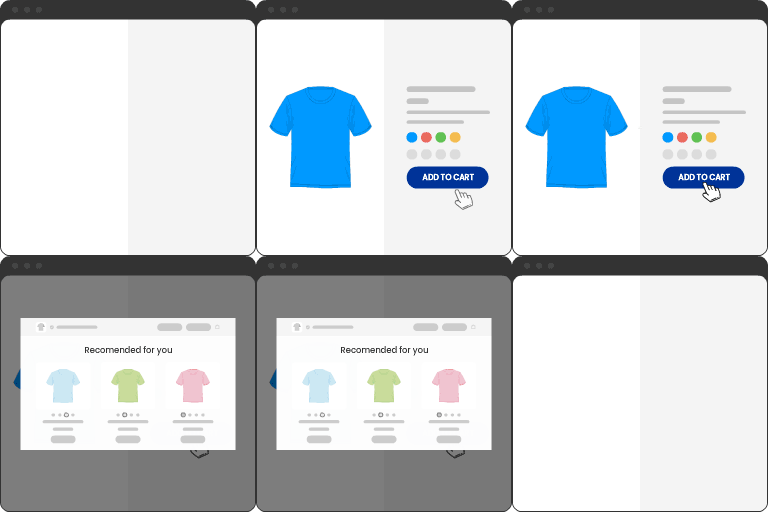
Leo Product Recommendations shows that suggestion at exactly the right moment. As soon as a product goes into the cart, a popup confirms it and shows the products you want to recommend. The shopper adds one with a single click, without leaving the page, and carries on shopping or goes to checkout.
No extra page, no redirect, no copy and paste of shortcodes. Install it, choose what to recommend, and the popup works on your shop, category and product pages.
Why store owners use it
- Bigger orders without more traffic. You already paid to get the visitor. The popup turns one item into two or three.
- Suggestions that make sense. You decide what goes with what, product by product, or set one rule for the whole store.
- Nothing to set up if you use Upsells and Cross-sells. The popup can show the ones you already added in WooCommerce.
- Shoppers stay in the flow. They add recommended products, including variable products with options, right inside the popup.
- You can measure it. GA4-ready dataLayer events show how much the recommendations sell.
How it works
- 01A shopper adds a product to the cart, from the shop page, a category page or the product page.
- 02A popup confirms the add and shows your recommended products.
- 03They add a recommendation with one click or carry on shopping. Products already in the cart are never suggested again.
Three ways to choose what to recommend
1. Your WooCommerce Upsells and Cross-sells. If you already set them under Product data > Linked Products, the popup uses them. Upsells come first, then Cross-sells. You can turn each one on or off.
2. Hand-picked products. On any product, open the Recommendations tab and pick what to suggest, then drag to set the order. Best for accessories and items you know sell together.
3. A store-wide rule. One rule covers every product you haven’t set up yourself, for example “4 best sellers from the same category” or “newest products tagged summer”. Filter by categories, tags and on-sale products, and sort by best selling, top rated, newest, oldest, price or random.





