The FinderPress tool directory
WordPress plugin
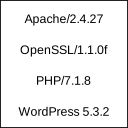
Show Apache and PHP version
Displays Apache and PHP version in footer of admin section for easy access. These information are usually needed if reporting bugs or checking hosting service configuration. WordPress displays only it’s own version which is not enough. Plugin is very simple and uses almost no resources. After all, i
PricingFree downloadThe WordPress.org download is free. Pro versions, add-ons or external services may cost extra.
CompatibilityRequires WordPress 2.6.1.
SourceWordPress plugins · Oct 19, 2026
01 / Source details
About this tool.
Displays Apache and PHP version in footer of admin section for easy access.
These information are usually needed if reporting bugs or checking hosting service configuration. WordPress displays only it’s own version which is not enough.
Plugin is very simple and uses almost no resources. After all, it just displays version information.
02 / Source details
Getting started.
- 01Extract package and upload to plugins directory
- 02Activate the plugin through the ‘Plugins’ menu in WordPress
03 / Source details
Frequently asked questions.
None
Keep exploring




