Remoji – Post/Comment Reaction and Enhancement
Add the slack style emoji to posts, pages or comments. Features: React with emojis to any post or comment. Post View counter. Compatible with all cache plugins! Easy to use. Automatically exclude bots. Disable comment on any post type (pages, posts, attachments). Most Viewed widget. Recent Reacted E
About this tool.
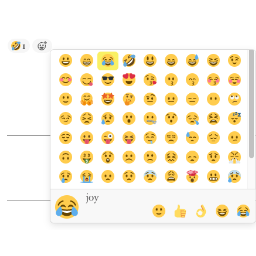
Add the slack style emoji to posts, pages or comments.
Features:
- React with emojis to any post or comment.
- Post View counter. Compatible with all cache plugins! Easy to use. Automatically exclude bots.
- Disable comment on any post type (pages, posts, attachments).
- Most Viewed widget. Recent Reacted Emoji Post widget.
- Allow guests reaction or logged-in user reaction only.
- GDPR compliant. With this feature turned on, all logged IPs get obfuscated (md5-hashed).
Post View
- 01Edit wp-content/themes/<YOUR THEME>/index.php or archive.php / single.php / post.php / page.php .
- 02In the loop while ( have_posts() ) { or anywhere you want to show the views, add the following codes: do_action( 'remoji_postview' ); .
API
To show postview in themes/plugins, use do_action( 'remoji_postview', $the_post_id_to_inquire ); .
Shortcode [views] available
Use [views] or [views id="3"] (To show the views of post ID 3) in your editor.
Screenshots & previews.
Frequently asked questions.
The reaction is not added / I see “Error happened”
Clicking an emoji sends a request to the REST endpoint /wp-json/remoji/v1/add . If reactions fail, the most common causes are:
- A security plugin, firewall (WAF) or server rule blocking the WordPress REST API.
- Another plugin overriding REST routes, or the REST API being disabled.
- Aggressive page caching serving a stale nonce to logged-in users (guests are unaffected as of 2.4).
Open your browser console: if the add request returns rest_no_route (404), the route is being blocked/rewritten before it reaches the plugin — allow the remoji/v1 REST namespace in your security plugin/firewall.




